
Case Study
Multi-Tenant Admin Platform
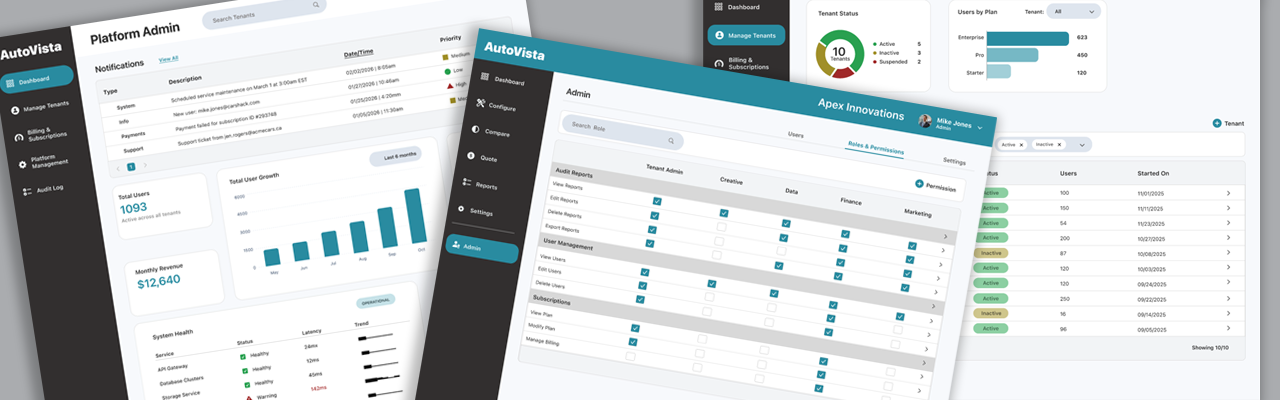
Role: UX Architect
Product: Multi-tenant B2B SaaS platform
Scope: Led end-to-end UX for admin, tenant, and permissions workflows
Team: PM, engineers, admin users
Goal: Simplify complex admin workflows across multiple organizations
Outcome: Reduced configuration errors and decreased task completion time for enterprise admins
I led UX design for a multi-tenant B2B SaaS platform used by enterprise customers to manage tenants, permissions, billing, and feature access across multiple organizations. The system supported complex governance rules and configuration states, which made admin workflows difficult to understand and error-prone. My role focused on restructuring the experience to align with user mental models while preserving the underlying system architecture.
Challenge
As B2B SaaS products scale, administration becomes exponentially more complex. Platform teams must manage hundreds or thousands of tenants, each with different plans, feature access, billing states, and security requirements - while tenant admins need clarity and control without exposure to platform-level complexity.
- The challenge was to design a multi-tenant admin system that:
- Enables platform administrators to efficiently manage tenants, features, billing, and system health at scale.
- Provides tenant administrators with intuitive user, role, and permission management.
- Utilizes AI-assisted workflows while balancing power and safety.
- Scales gracefully as tenants, features, and permissions grow.
Design Goals
- Clear role boundaries: Platform admins and tenant admins have different mental models, responsibilities, and risk profiles.
- Information clarity: Admin tools are information-dense by necessity - but must still be scannable, predictable, and safe.
- Operational efficiency at scale: Actions must support bulk operations, overrides, and auditing without sacrificing clarity.
- Enterprise-grade trust: Clear status indicators, auditability, and permission transparency are essential.
AI-Assisted Workflow Integration
AI was introduced to assist platform admins in reducing manual effort, surfacing relevant insights, and preventing errors. The goal was not to replace human judgment, but to make the tools smarter, safer, and more efficient.
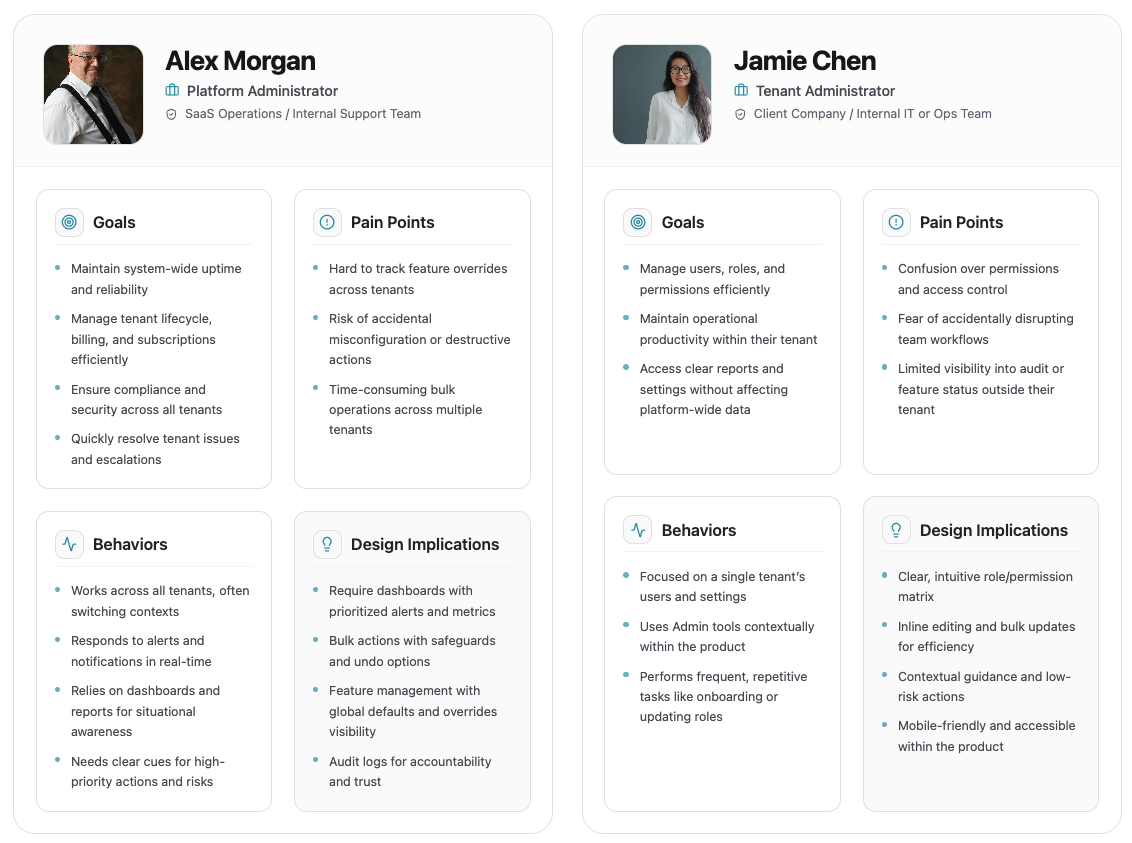
Users & Mental Models
- Keeps the platform running behind the scenes.
- Works across many customers at once, watching for risk, failures, and edge cases.
- Cares most about reliability, revenue impact, and avoiding mistakes at scale.
- Manages the system for their own team.
- Focuses on who has access and how work gets done day to day.
- Wants straightforward control without needing to understand the whole platform.
Platform Admin
Tenant Admin
Personas
Information Architecture Strategy
The information architecture separates platform-level governance from tenant-level day-to-day management.
| Platform Admin | Tenant Admin |
| System-wide visibility | Tenant-scoped visibility |
| Feature access & roll out | Enable features & settings |
| Plans, billing & revenue | Users and Permissions |
| Audit and compliance | Team management |
Platform Admin Tool
Research Goals
- Understand how platform admins think about tenants, features, and risk.
- Identify breakdowns in the current tool experience.
- Validate how tenant admins expect to manage users and permissions.
Research Methods Used
- User interviews and direct observation (platform operations, customer support, finance/billing, security/compliance).
- Observed admins completing real tasks.
- Key Insights:
- Admins focus on exceptions and edge cases.
- Overrides are common, but poorly tracked.
- Audit logs are used after problems occur, not as early warnings.
- Observed Workflows:
- Investigating billing issues, enabling beta features, responding to alerts.
- Friction points: context switching, limited visibility, repetitive manual actions.
Dashboard Wireframe Exploration
To validate layout hierarchy and information density, low-fidelity wireframes were created before visual design. These helped define alert visibility, KPI placement, and system monitoring priorities for platform administrators.

Key decisions:
- Priority notifications placed at the top for fast scanning
- KPI tiles grouped for executive overview
- System health and anomaly detection visible without navigation
- Global tenant search accessible at all times
Dashboard
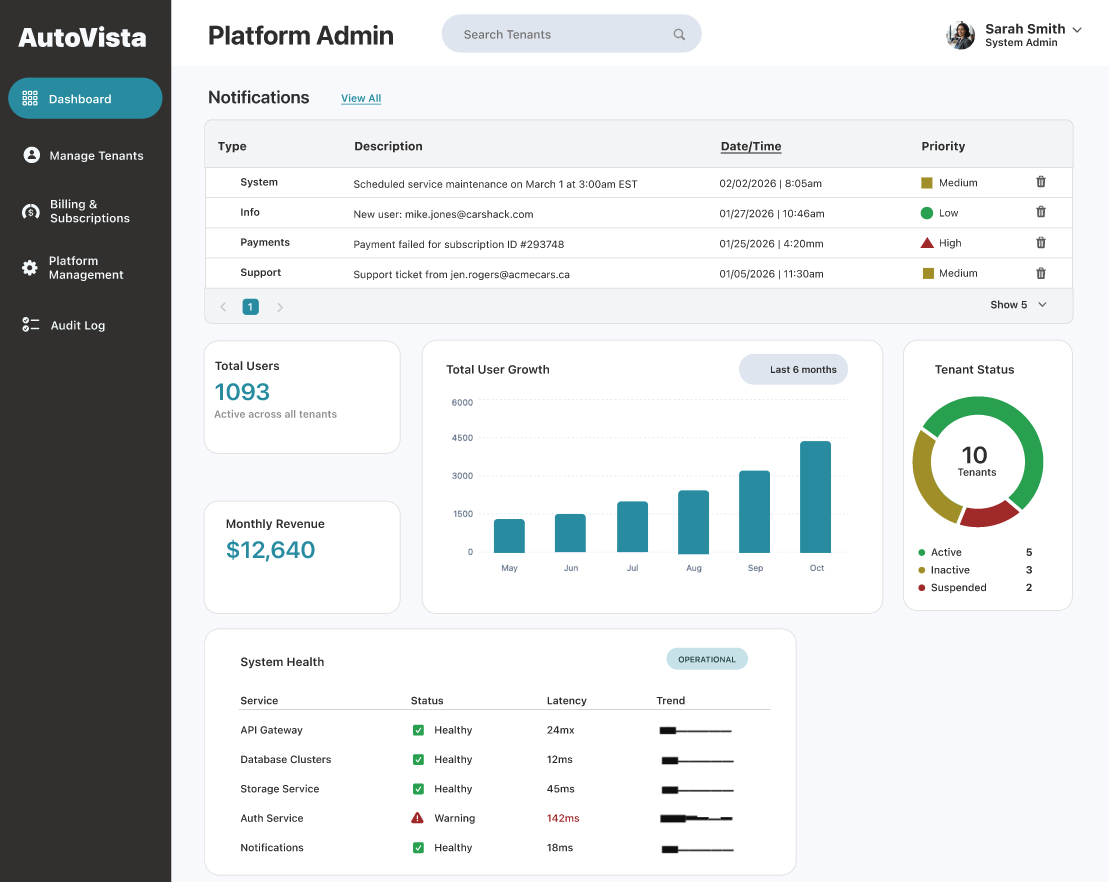
- Notification grid with priority levels:
- Priority levels highlights urgent system alerts.
- Executive and operational KPI tiles summarize total users, system health, monthly revenue, and tenant status.
- Global tenant search enables rapid lookup for support workflows.
- Observed Pain Points:
- Admins manually identify anomalies and edge cases.
- Context switching across screens slows decision-making.
- Repetitive monitoring of system and billing issues is time-consuming.
- AI Enhancement - Anomaly Detection:
- AI continuously monitors tenant activity, billing patterns, and system health in real-time.
- Automatically surfaces outlier tenants or unusual billing events directly on the dashboard.
- Impact Metrics:
- Time to identify at-risk tenants reduced by 50%.
- Early detection reduces reactive support tickets.
Manage Tenants
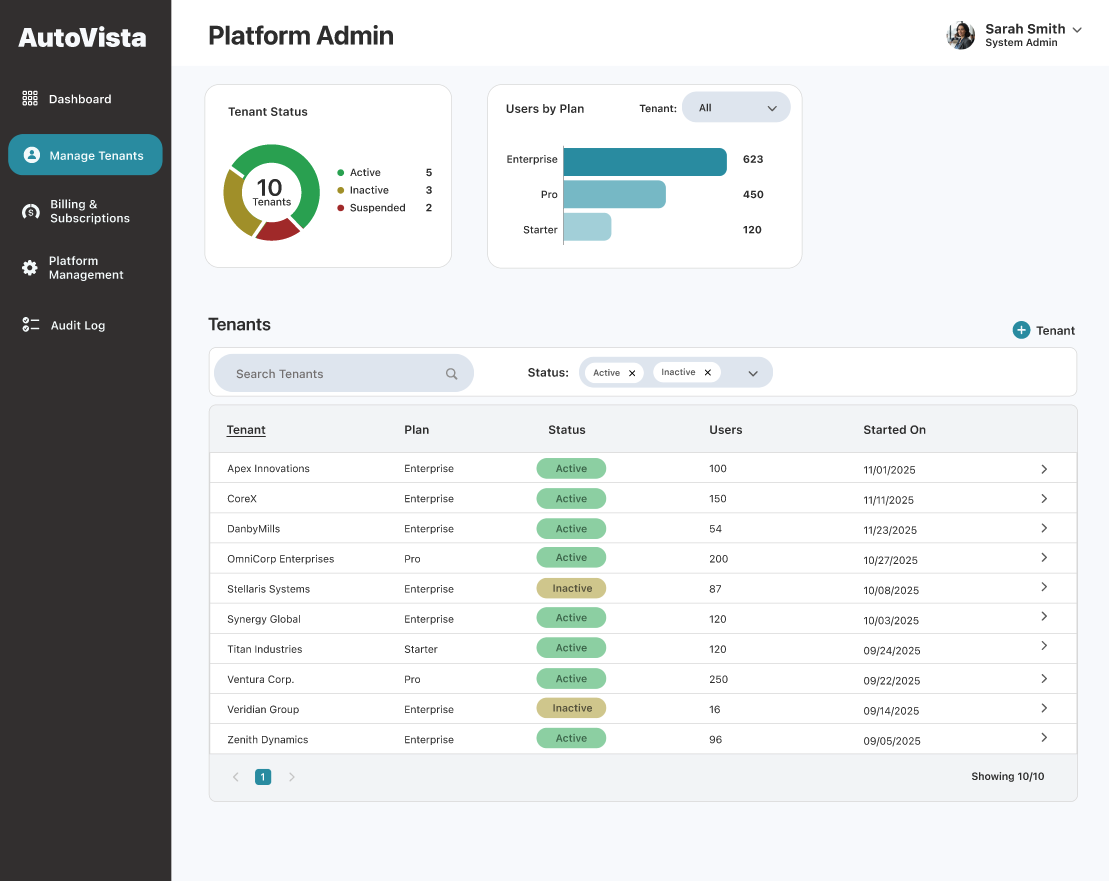
- Designed for pattern recognition (e.g., stalled tenants, growth signals) and fast drill-down.
Tenant Details
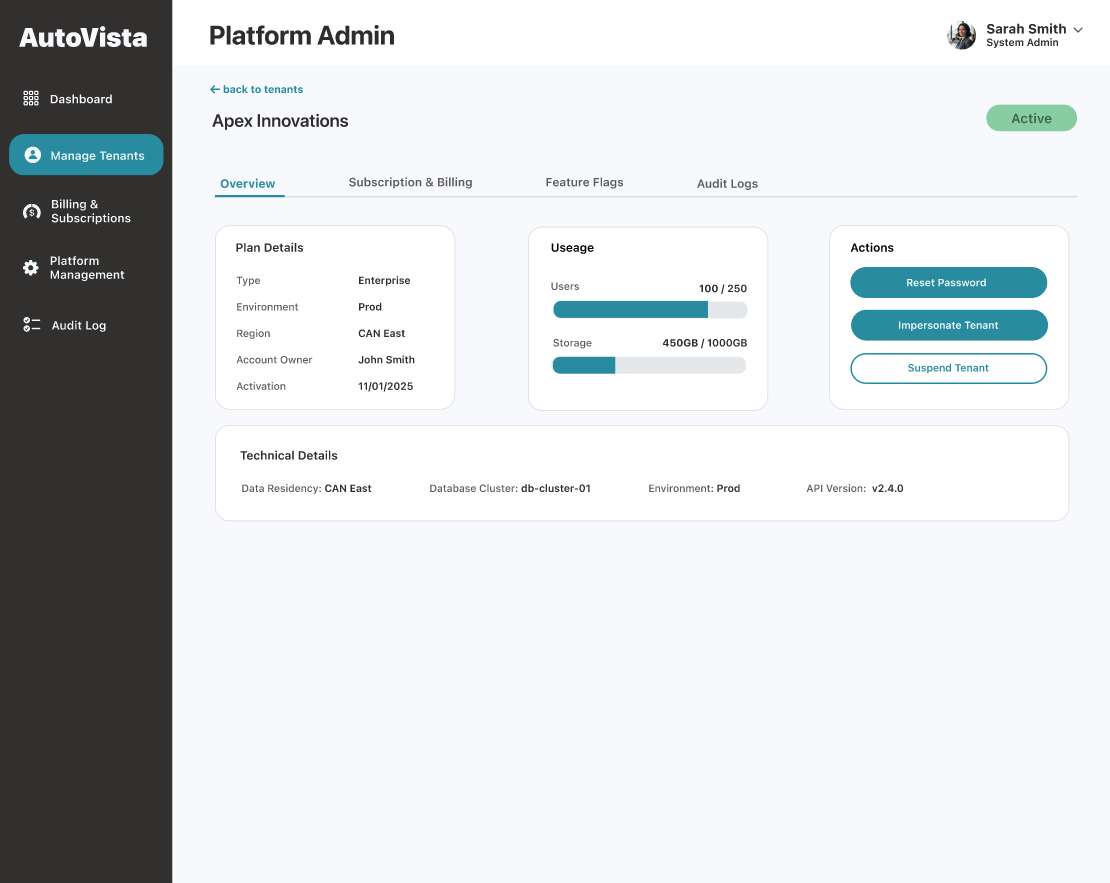
Overview
- Actions include Reset Password, Impersonate Tenant, Suspend Tenant.
- Destructive or sensitive actions are friction-aware to prevent misuse.
- AI Enhancement - Smart Audit and Recovery:
- AI flags risky overrides based on historical patterns.
- Suggests rollback strategies when feature or permission changes may cause issues.
- Provides probable impact scenarios before committing changes, increasing admin confidence.
- Impact Metrics:
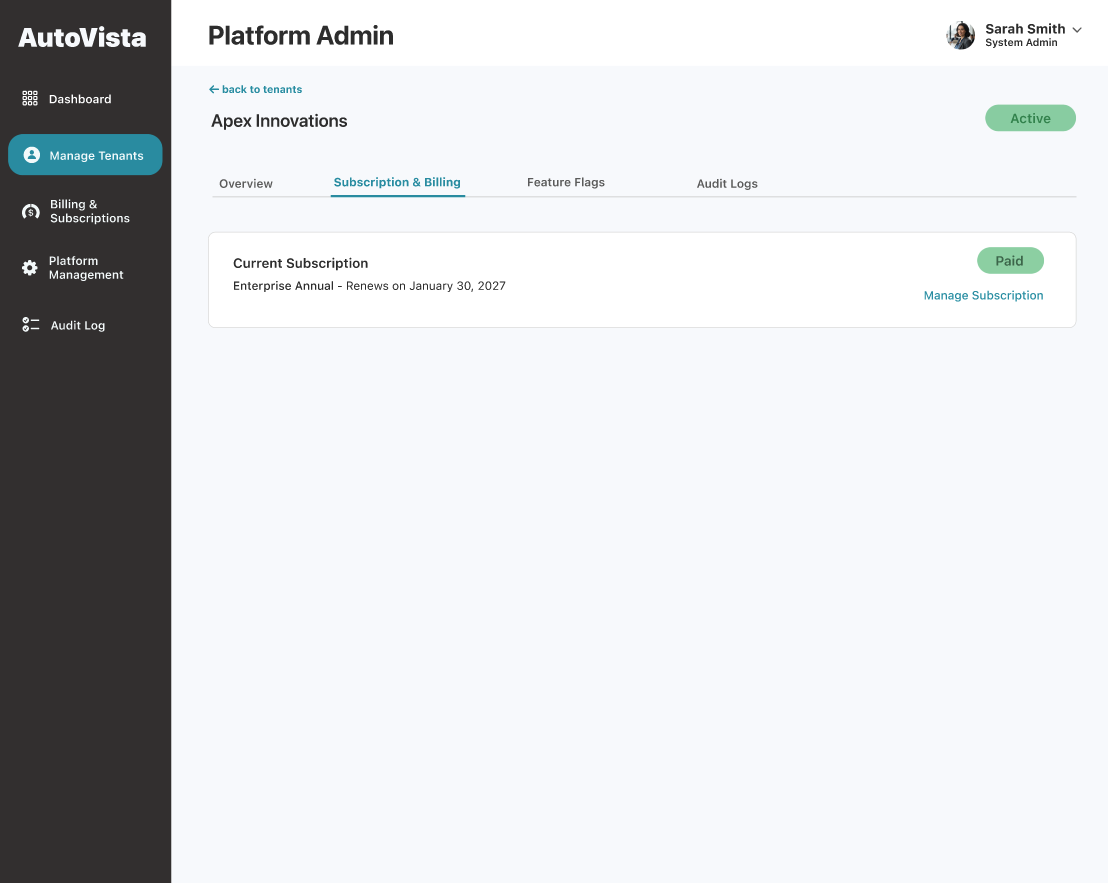
Subscriptions and Billing
- Supports finance and support teams with self-serve access without jumping tools.
- Clear visibility of tenant subscriptions, plan states, payment status, and invoice download.
- AI Enhancement - Billing Anomaly Suggestions:
- AI highlights unusual billing patterns (e.g., failed payments, overdue invoices).
- Suggests proactive follow-up actions to prevent downstream support issues.
- Impact Metrics:
- Reduced billing-related support tickets.
- Faster resolution of billing discrepancies.
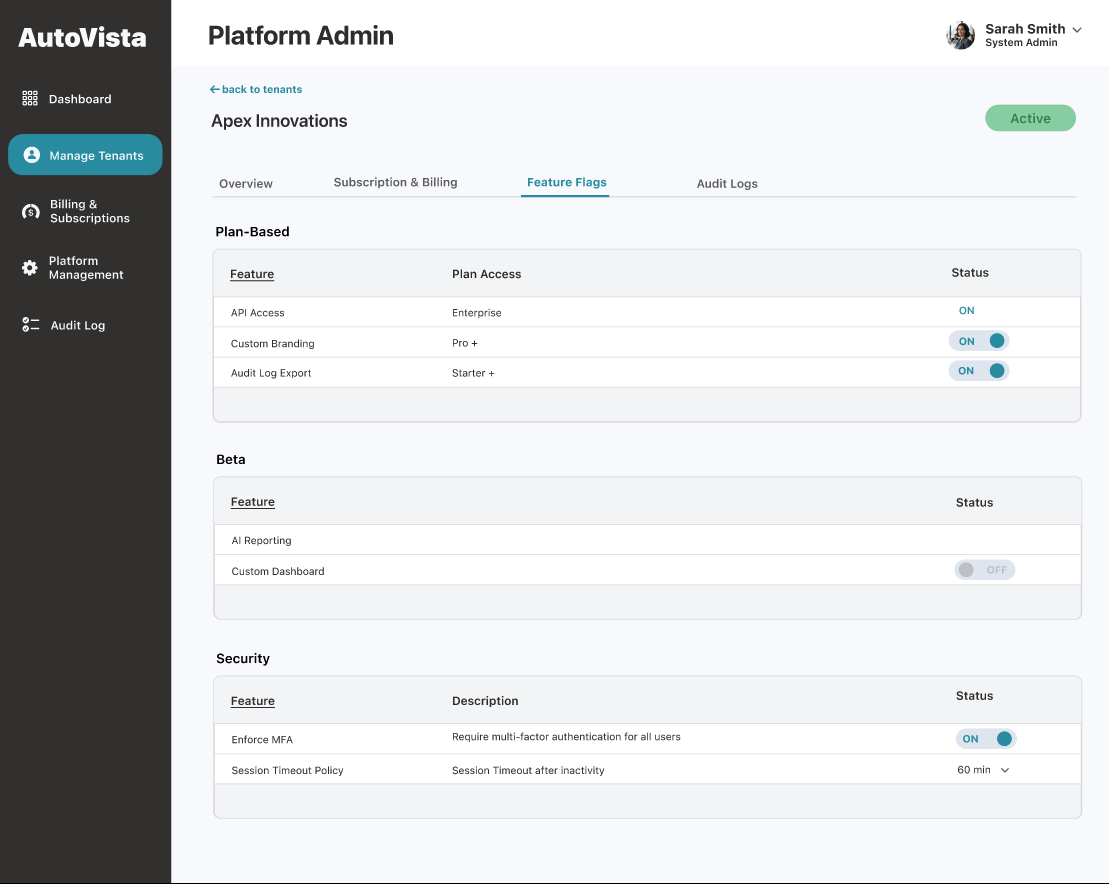
- Plan-based, beta, and security features with ON/OFF toggles and locked states.
- Clear override indicators for tenant-specific changes.
- Global defaults with drill-in for active tenants and overrides.
- Global default states.
- Number of active tenants.
- Number of overrides.
- List all tenant overrides.
- Bulk selection to remove overrides.
- Improved operational efficiency : Faster identification of anomalies and smarter bulk actions.
- Increased accuracy: Reduced misconfigurations with AI guidance and rollback suggestions.
- Increased trust: Admins make confident decisions with early warnings, clear insights, and actionable AI recommendations.
- Time to locate a tenant: Reduced from 45s to 15s, validating improvements to global search and tenant list scannability.
- Time to resolve a tenant issue: Reflects the effectiveness of dashboard alerts, tenant drill-in, and feature visibility.
- Bulk action usage rate: Indicates whether bulk overrides and management tools are reducing repetitive manual work.
- Misconfiguration-related Incidents: Tracks whether locked features, explicit override states, and clearer audit trails reduce mistakes.
- Rollback time for feature overrides: Measures how quickly admins can recover when issues occur.
Feature Flags
Platform Management
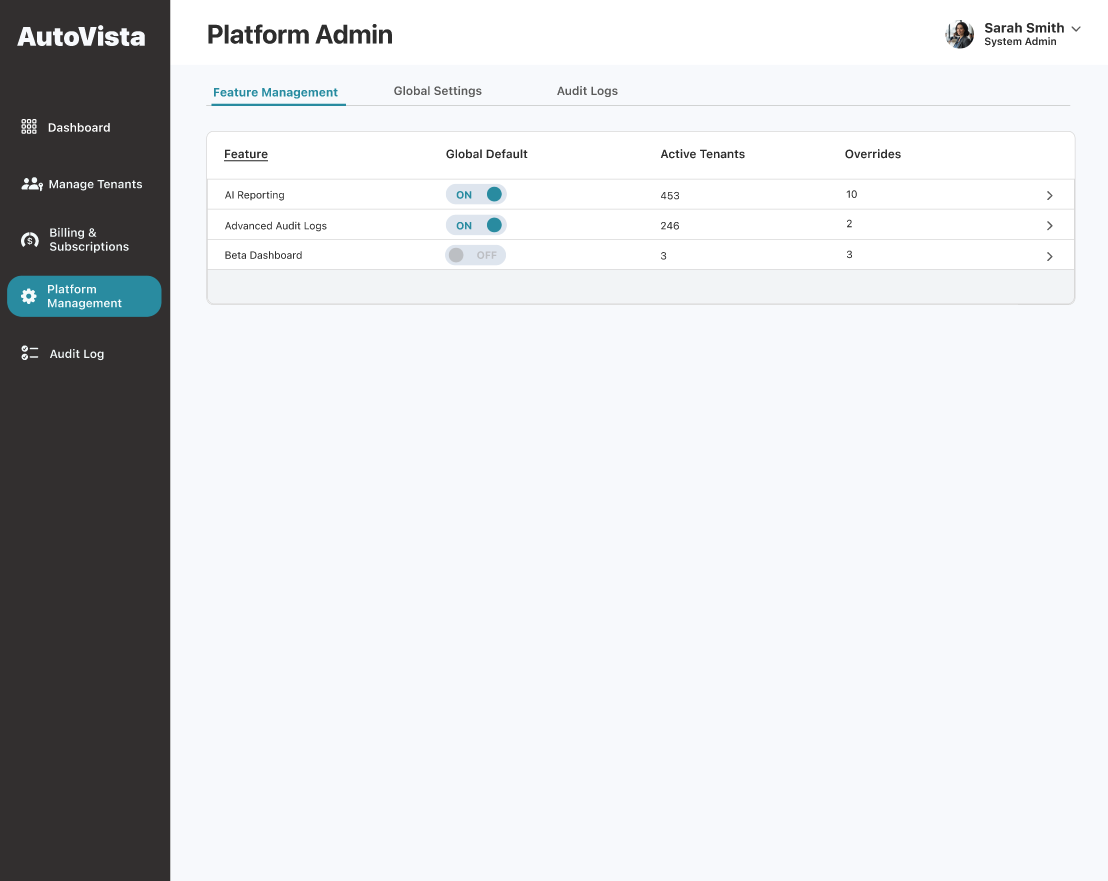
- Feature Management:
Supports drill-in for more detail.
Feature Drill-In (modal)
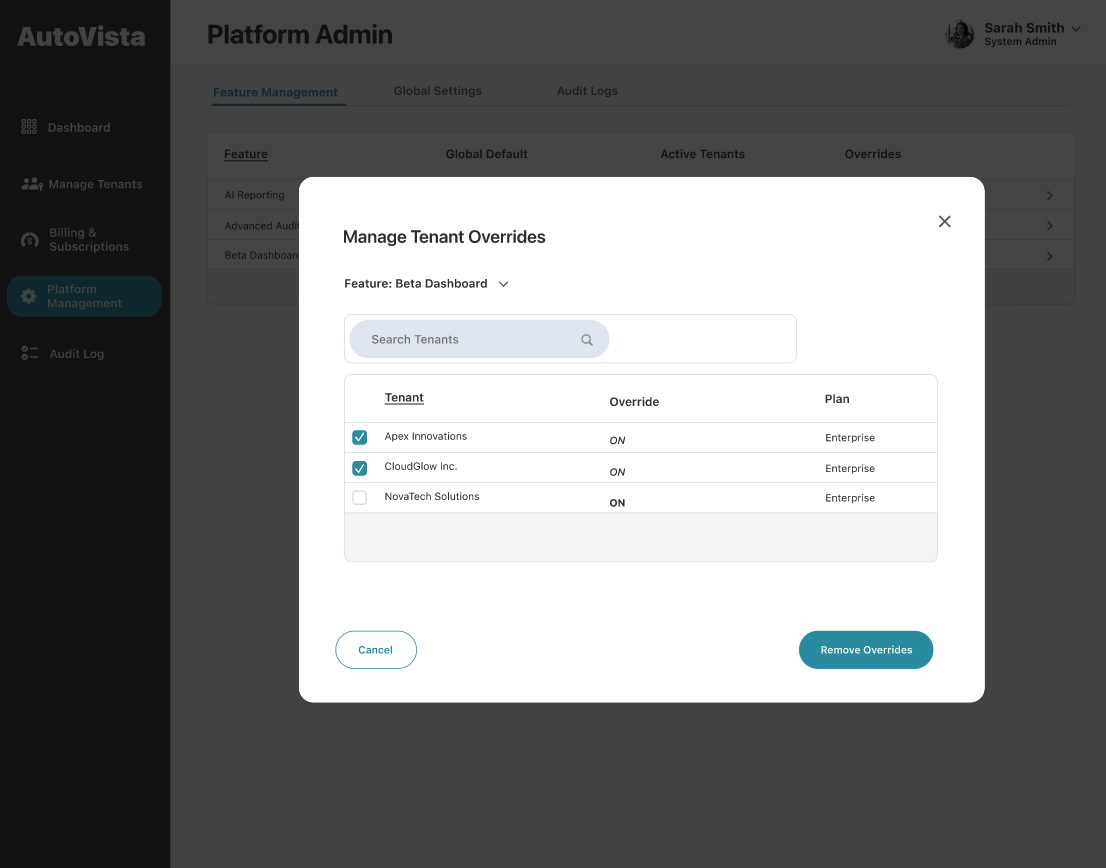
Modal keeps admins in context while performing potentially high-impact actions, reducing navigation errors.
Platform Admin Success Metrics
Integrating AI assistance resulted in:
Operational Efficiency
Error & Risk Reduction
Tenant Admin Tool
Accessed directly within the product via an Admin button, reinforcing that this is a contextual extension, not a separate system.
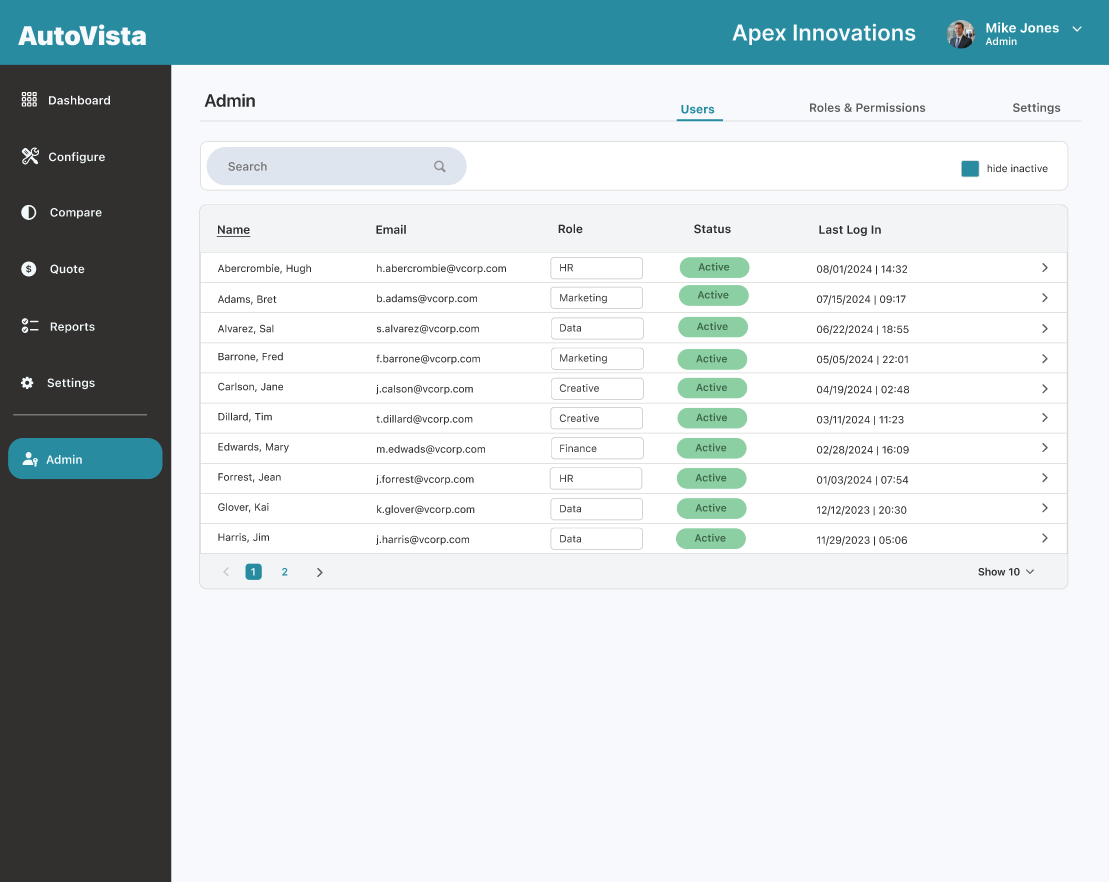
Users
- Email.
- Role (selectable).
- Status.
- Last Login.
Focus on reducing friction for high-frequency tasks like onboarding, offboarding, and role changes. Inline editing and auto-save supports fast updates and eliminates risk of lost work.
Roles and Permissions
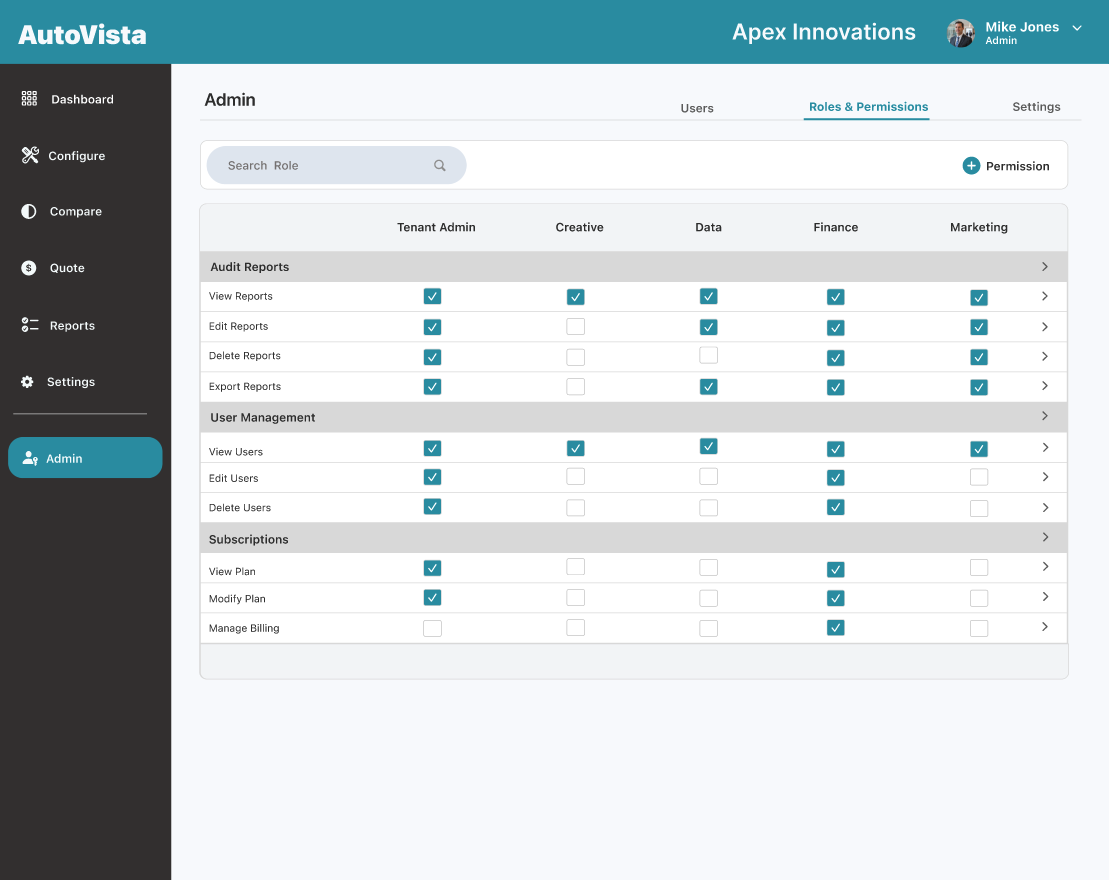
- Matrix View
- Users x Permissions.
- Checkbox assignment.
- Add new permissions.
This format mirrors how admins think about access control relationships, not isolated settings pages.
Settings
Tenant-specific configuration without exposure to platform-level concepts.
Tenant Admin Success Metrics
- Time to onboard a new user.
- Clarity of user and role management flows.
- Role/Permission assignment success rate.
- Reduced admin-related support tickets.
- Admin feature adoption rate.
Task Completion
Support Deflection
Engagement and Trust
Key Solutions:
Reducing Risk - Platform Admin:
- Locked features and explicit override states.
- Grouped destructive actions.
- Audit logs for traceability and recovery.
Scaling Without Redesign:
- Modular information architecture.
- Feature-based governance.
- Bulk actions for repetitive tasks
- Consistent patterns.
Balancing Power & Usability - Tenant Admin:
- Progressive disclosure of advanced controls.
- Contextual actions tied to people and roles.
- Clear separation between platform and tenant responsibilities.